


Hi,
Great component so far. I'm trying to have the subcategory view show the folder names with images but for some reason I can't get it to show. I've tried all the different options and can't figure it out. I do not want the subcategory list to show. I just want the images and folders to have their associated names showing. I tried the Display Name option but it didn't seem to work. Is what I am looking for possible?
Also, the parameters names could use a revamp. Many are very similar and hard to distinguish.
Thanks.
category and image name not showing
-
schilly
- Phoca Newbie

- Posts: 5
- Joined: 24 Apr 2009, 01:36
-
caro84g

- Phoca Hero

- Posts: 1369
- Joined: 11 Feb 2008, 17:52
- Location: Holland
- Contact:
Re: category and image name not showing
Hi,
the display name option should be working. I just don't know what you mean with:
Regards, Carolien
the display name option should be working. I just don't know what you mean with:
Could you post a screenshot with what you want, or could you find a demo page where it is displayed?schilly wrote:I'm trying to have the subcategory view show the folder names with images but for some reason I can't get it to show.
--cut--
I do not want the subcategory list to show. I just want the images and folders to have their associated names showing.
Regards, Carolien
Please ask your support questions in the forums and not via PM - I delete those PM's
Backup before you do any major change to your website (and test first)
Backup before you do any major change to your website (and test first)
-
caro84g
- Phoca Hero
- Posts: 1369
- Joined: 11 Feb 2008, 17:52
- Location: Holland
- Contact:
Re: category and image name not showing
I agree with you, it's just that I'm too long involved with Phoca Gallery to come up with better names.schilly wrote:Also, the parameters names could use a revamp. Many are very similar and hard to distinguish.
If you have a proposal please post it in a new topic.
Regards, Carolien
Please ask your support questions in the forums and not via PM - I delete those PM's
Backup before you do any major change to your website (and test first)
Backup before you do any major change to your website (and test first)
-
schilly
- Phoca Newbie
- Posts: 5
- Joined: 24 Apr 2009, 01:36
Re: category and image name not showing
Thanks for the reply Carolien. Here are the screenshots
I got my top level how I want:
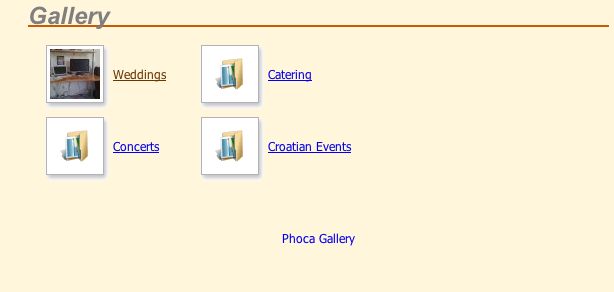
Now the subcategory I'm trying to have the folder names show without the category view(I think that's the right term)
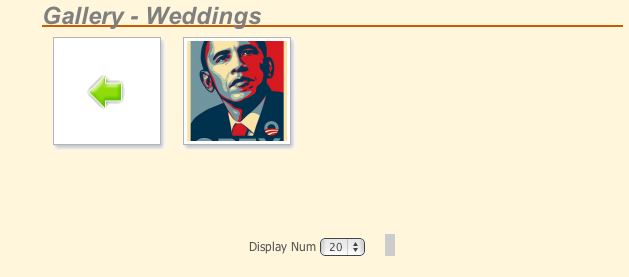
and for some reason I can't get the names to show. Any help is much appreciated.
Thx.
I got my top level how I want:
Now the subcategory I'm trying to have the folder names show without the category view(I think that's the right term)
and for some reason I can't get the names to show. Any help is much appreciated.
Thx.
-
caro84g
- Phoca Hero
- Posts: 1369
- Joined: 11 Feb 2008, 17:52
- Location: Holland
- Contact:
Re: category and image name not showing
Hi,
go to the menu item 'component parameters', second box on the right, and under 'category view settings 'thumbnails'', set display name to 'show' or to 'show category name only' (with the latter you don't see the names of the images, but only of the subcategories)
By the way, I miss the outer line (box), or did you set this to transparant (or the background color)?
Regards, Carolien
go to the menu item 'component parameters', second box on the right, and under 'category view settings 'thumbnails'', set display name to 'show' or to 'show category name only' (with the latter you don't see the names of the images, but only of the subcategories)
By the way, I miss the outer line (box), or did you set this to transparant (or the background color)?
Regards, Carolien
Please ask your support questions in the forums and not via PM - I delete those PM's
Backup before you do any major change to your website (and test first)
Backup before you do any major change to your website (and test first)
-
schilly
- Phoca Newbie
- Posts: 5
- Joined: 24 Apr 2009, 01:36
Re: category and image name not showing
ok that's what i thought. in those screenshots the display name was set to show. so not sure what's going on here.
and the outer line is the same as the bg.
and the outer line is the same as the bg.
-
caro84g
- Phoca Hero
- Posts: 1369
- Joined: 11 Feb 2008, 17:52
- Location: Holland
- Contact:
Re: category and image name not showing
Hmm, me neither... What happens if you also set 'display detail' to show?
Are you sure you set this in the menu-item (those override the globals)
Regards, Carolien
Are you sure you set this in the menu-item (those override the globals)
Regards, Carolien
Please ask your support questions in the forums and not via PM - I delete those PM's
Backup before you do any major change to your website (and test first)
Backup before you do any major change to your website (and test first)
-
schilly
- Phoca Newbie
- Posts: 5
- Joined: 24 Apr 2009, 01:36
Re: category and image name not showing
ah you got it. forgot there was parameters in the menu-item item and i guess when i first set it up i turned display name off. everything looks good now.
thank you so much Carolien.
thank you so much Carolien.
-
caro84g
- Phoca Hero
- Posts: 1369
- Joined: 11 Feb 2008, 17:52
- Location: Holland
- Contact:
Re: category and image name not showing
you're welcome 
Please ask your support questions in the forums and not via PM - I delete those PM's
Backup before you do any major change to your website (and test first)
Backup before you do any major change to your website (and test first)