Page 1 of 2
Line 344 and Cannot Add Category Errors
Posted: 19 Nov 2009, 07:52
by waxgod
Hello!
Ok, here's the problem:
After not trying to add any pictures or categories for a month or two, we're not getting both of these errors in the backend of Joomla:
Warning: mysql_num_rows(): supplied argument is not a valid MySQL result resource in /home/.*******/****/*****.com/libraries/joomla/database/database/mysql.php on line 344
And,
Error Saving Phoca Gallery Categories
We have not updated Phoca Gallery recently however we have updated Joomla to 1.5.15 (most recently). After searching extensively on here and google, we have yet to find a clear solution. All tables seem to be in order and the front end works fine.
We're not really very good with MySql but can follow instructions. Please, can anyone help us work through this problem?
Thanks
Re: Line 344 and Cannot Add Category Errors
Posted: 19 Nov 2009, 09:46
by reko
which version of phoca gallery are you using?
Re: Line 344 and Cannot Add Category Errors
Posted: 19 Nov 2009, 10:05
by juntima
Thanks for the reply it is 2.5.8
Re: Line 344 and Cannot Add Category Errors
Posted: 19 Nov 2009, 10:35
by waxgod
The DB
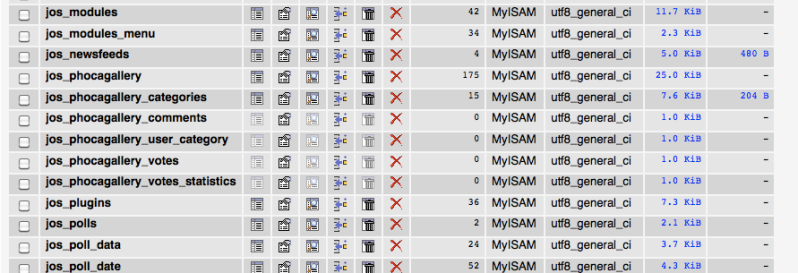
phocagallery table
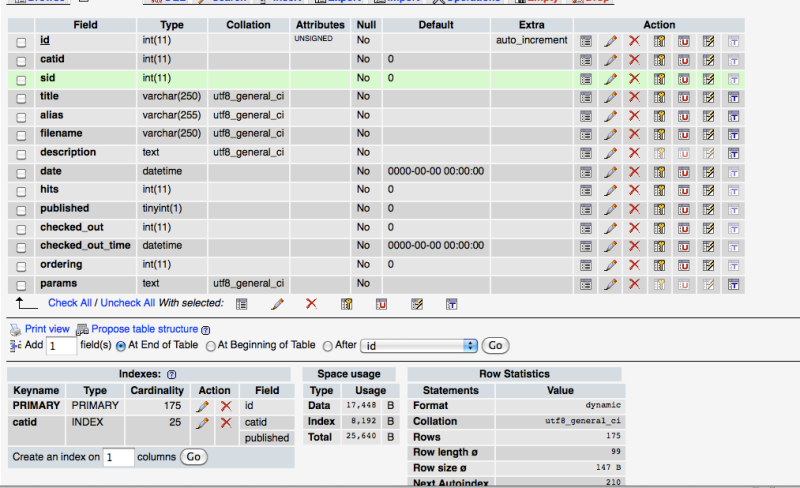
categories table
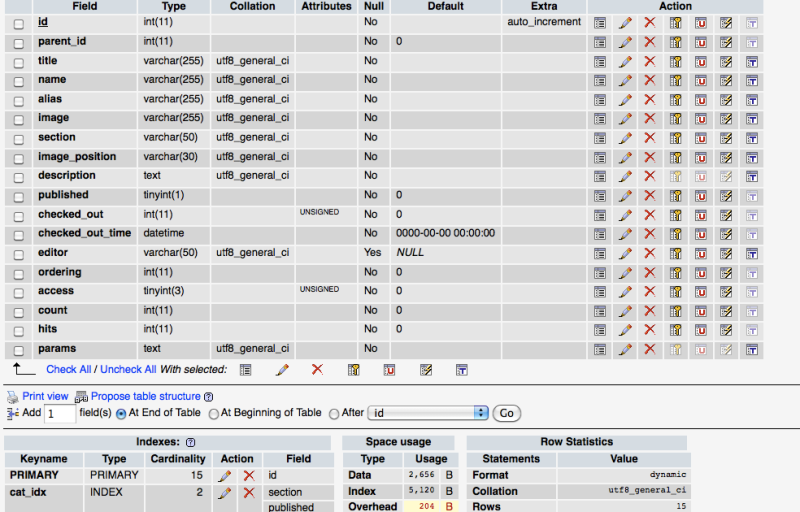
comments
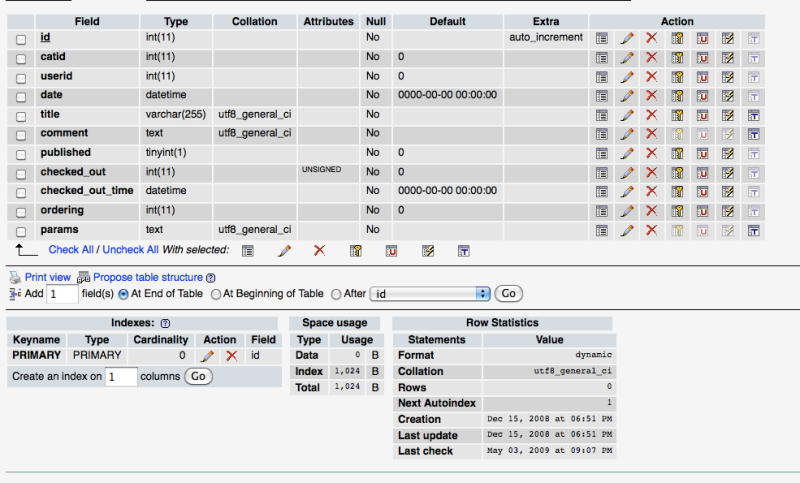
Re: Line 344 and Cannot Add Category Errors
Posted: 19 Nov 2009, 10:43
by reko
hi,
are you, waxgod and juntima, talking about the same site?
judging from the images, it looks like you're missing 2 columns in your db-tables...
see
https://www.phoca.cz/documents/2-phoca-g ... ca-gallery for more information (the bottom part)
/rk
Re: Line 344 and Cannot Add Category Errors
Posted: 19 Nov 2009, 11:00
by juntima
Thanks again for the reply we are talking about the same site.
Re: Line 344 and Cannot Add Category Errors
Posted: 25 Nov 2009, 07:32
by juntima
Hi is there any chance of a step by step tutorial to resolve this problem any help would be appreciated.
Re: Line 344 and Cannot Add Category Errors
Posted: 25 Nov 2009, 14:11
by reko
i think you have to follow these steps (from the link i postet above):
If you have all tables in your database (e.g. you are upgrading from 2.1.0 to 2.2.0) check the columns of your tables. E.g. in Phoca Gallery version 2.2.0 there are new colums: extlink1, extlink2 and these should be added into table: #__phocagallery. In case you are upgrading e.g. from 2.1.0 to 2.2.0 and you got some error message while automatically upgrading of Phoca Gallery tables, check the #_phocagallery table and if extlink1 or extlink2 columns are missed, then run the SQL query for 2.2.0 version:
ALTER TABLE `#__phocagallery` ADD `extlink1` text NOT NULL AFTER `params` ;
ALTER TABLE `#__phocagallery` ADD `extlink2` text NOT NULL AFTER `extlink1` ;
If you're upgrading to 2.2.2 then run also the SQL query for the 2.2.2 version:
ALTER TABLE `#__phocagallery_categories` ADD `date` datetime NOT NULL default '0000-00-00 00:00:00' AFTER `description` ;
change # to the table-prefix you're using (most likely §_jos) an run the commands from in database management (eg. phpmyadmin)
but as always make a backup before you do anything!
Re: Line 344 and Cannot Add Category Errors
Posted: 26 Nov 2009, 07:35
by waxgod
First off, thank you for your time and replies!
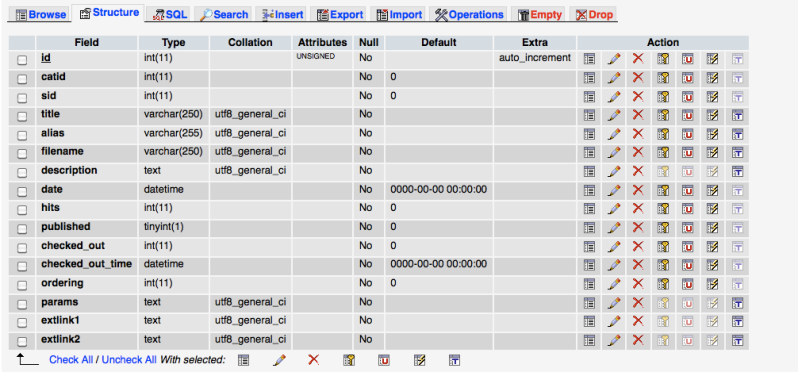
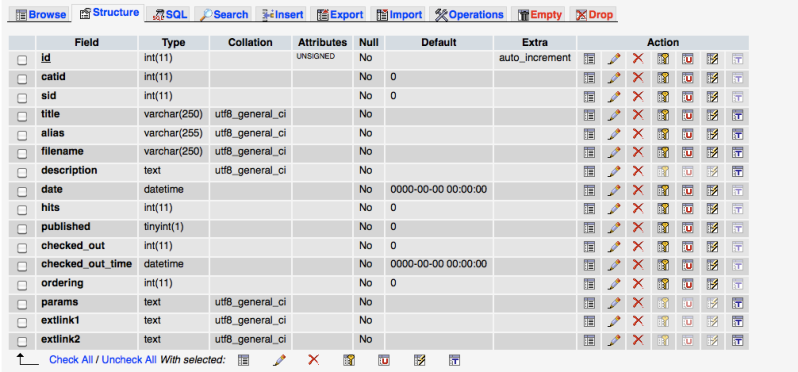
We've figured out how to run SQL queries and successfully altered both phocagallery and phocagallery_categories. There were no errors after running the queries. But it not fix our problem!!

We're still getting the same Line 344 on the "Images" page in the back-end and cannot add new categories either.
Here are the new screens:
Please help.
Re: Line 344 and Cannot Add Category Errors
Posted: 27 Nov 2009, 12:02
by reko
I once had a similar problem, see this thread:
viewtopic.php?f=1&t=3737&start=10#p18217
if that doesn't help, i don't know any further...