Page 1 of 2
How to change the appearance of a category?
Posted: 28 Mar 2021, 17:26
by Vlad Ghitulescu
Hey!
I created a menu that shows a Phoca Gallery category
https://www.dropbox.com/s/b0uk2urqjzyog ... t.png?dl=0
or online here
http://www.tuttmannschule-essen.de/beta ... ehrere-pgs
.
How can I change the appearance of the category, like dimensions, background, font for the name etc.?
Thanks!
Regards,
Vlad
Re: How to change the appearance of a category?
Posted: 28 Mar 2021, 17:42
by Benno
Hi,
like dimensions
If you mean dimensions of the thumbnails, you can change it in Phoca Gallery Options --> Thumbnails
background, font for the name etc.
Via CSS.
Kind regards,
Benno
Re: How to change the appearance of a category?
Posted: 28 Mar 2021, 18:23
by Vlad Ghitulescu
Benno,
thanks for your quick reply!
However even after altering the settings under System > Configuration > Global > Phoca Gallery > Thumbnails (especially the Large & Small Image Width / Height) the dimensions of the category thumbnail remains the same.
https://www.dropbox.com/s/2qe1mc0u7q8ec ... l.png?dl=0
Changing the Medium Image Width and Height affects only the dimensions of the background (the white square) of the thumbnail and not the thumbnail itself.
Regards,
Vlad
Re: How to change the appearance of a category?
Posted: 28 Mar 2021, 18:56
by Benno
Hi,
when you change the size of thumbnails you need to recreate them.
Backend --> Components --> Phoca Gallery --> Images --> 'Recreate Thumbnails' Button
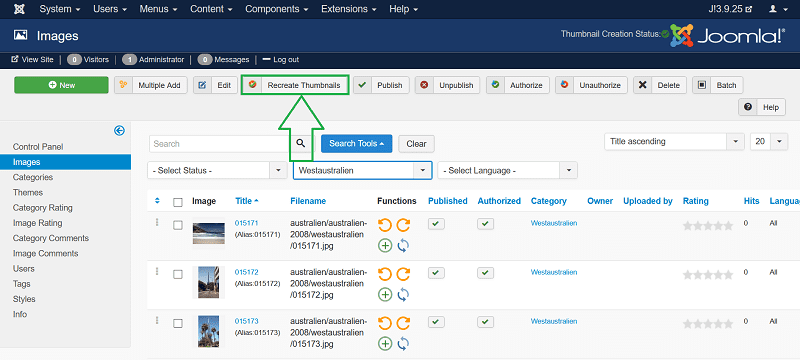
Kind regards,
Benno
Re: How to change the appearance of a category?
Posted: 28 Mar 2021, 20:12
by Vlad Ghitulescu
Hey, Benno!
Thanks for the tip with recreating the thumbnails BUT it didn’t work:
https://www.dropbox.com/s/8vsdgn324m6tc ... s.png?dl=0
https://www.dropbox.com/s/3g30wozosw387 ... s.png?dl=0
As you can see in the browser window on the left side the thumbnail of the collection stays exactly the same. :-(
Regards,
Vlad
Re: How to change the appearance of a category?
Posted: 28 Mar 2021, 20:14
by Benno
Hi,
did you clear your browser cache?
Kind regards,
Benno
Re: How to change the appearance of a category?
Posted: 28 Mar 2021, 20:34
by Vlad Ghitulescu
Hi!
Yes, I did.
I even deleted the whole page - it's a test website - and re-created again. The thumbnail of the category doesn't change.
Regards,
Vlad
Re: How to change the appearance of a category?
Posted: 28 Mar 2021, 20:45
by Benno
Hi,
ok, if you like you can send me backend login details (Super User Rights) of your site and I will take a look.
You will find my email at Impressum of my page. See signatur.
Kind regards,
Benno
Re: How to change the appearance of a category?
Posted: 28 Mar 2021, 20:52
by Vlad Ghitulescu
Hi, Benno!
Benno wrote: 28 Mar 2021, 20:45
You will find my email at Impressum of my page. See signatur.
I am probably to new to the forum so I get only
"You are not authorised to view the member list or profiles."
:-(
Could you please send me a direct email to
Vlad@Ghitulescu.de
?
Sorry & thanks!
Regards,
Vlad
Re: How to change the appearance of a category?
Posted: 28 Mar 2021, 21:26
by Benno
Send!
Kind regards,
Benno