Page 1 of 1
Cropping problems
Posted: 15 Aug 2020, 01:52
by Reno Holland
My landscape photos show up copped in Category View and Detail View.
I have checked every possible option I can think of: Set Crop to None, recreate thumbnails etc and I cannot get it fixed.
Any idea for a solution?
And in addition to that: Display Download Button does not work either.
Thanks
Reno
Re: Cropping problems
Posted: 15 Aug 2020, 11:36
by Jan
Hi,
if you set crop function to no, then you need to recreate thumbnails again - so new thumbnails are created without cropping.
Do you use some cache method on your site? Did you clear cache in your browser to see newest changes on your site?
Jan
Re: Cropping problems
Posted: 15 Aug 2020, 17:36
by Reno Holland
Thank you Jan for the quick reply.
I got it to work now, the images show up like the should.
However, in Category View I cannot the Detail and Download icons to show up.
I checked the settings of course.
Reno
Re: Cropping problems
Posted: 15 Aug 2020, 17:45
by Benno
Hi,
check your Phoca Gallery Options settings:
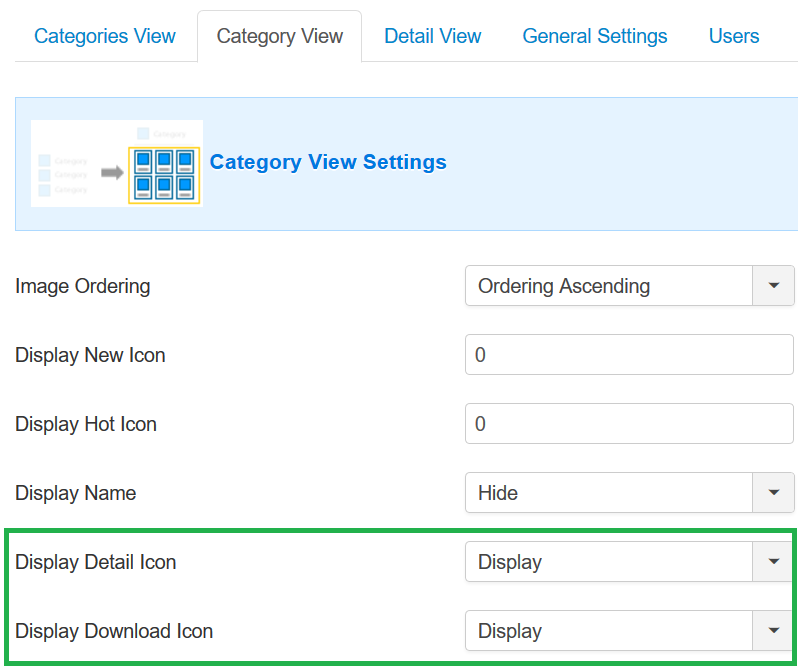
and clear all caches.
Kind regards,
Benno
Re: Cropping problems
Posted: 15 Aug 2020, 21:11
by Reno Holland
The setting are correct. I cleared the cache, cleared the browser cash, tried different browsers and the icons won't show up.
May be the icons do not exist and I should re-install the component.
Re: Cropping problems
Posted: 15 Aug 2020, 23:36
by christine
Hi,
Try following (if it's set to Yes): Go to PG Options > General Settings > Bootstrap 3 Icons > No
Kind regards
Christine
Re: Cropping problems
Posted: 17 Aug 2020, 21:01
by Reno Holland
I decided to re-install the gallery on my local server (Wampserver) and everything is working fine now.
Probably by the end of the week my new site will be going live.
Thank you for your help and keep up the good work.
Reno
Re: Cropping problems
Posted: 18 Aug 2020, 20:24
by Jan
Ok