Page 1 of 1
Image loaded properly but not seen
Posted: 26 May 2016, 10:32
by Morris-the-top
Hi,
I have a problem with phoca gallery.
When you load an image, this saw is loaded correctly, however, you do not see.
I tried to look at the permissions on the folder, putting them to CHMOD 777, but the result does not change: the images are loaded correctly, but do not see, you see a gray background but no picture.
Hel me please
Best Regards
Re: Image loaded properly but not seen
Posted: 26 May 2016, 10:51
by christine
Hi,
did you enable Thumbnails Generation?:
Enable Thumbnails Generation (Yes | No) Enable or disable Thumbnails Generation (Automatically thumbnails generation can be disabled e.g. in case some errors occur while thumbnails generating)
More information:
https://www.phoca.cz/documents/2-phoca-g ... e-joomla-3
Kind regards, Christine
Re: Image loaded properly but not seen
Posted: 26 May 2016, 12:04
by Morris-the-top
hiHello,
currently in:
OPTIONS ---> THUMBNAILS ----> ENABLE THUMBNAILS
ENABLE THUMBNAILS is NO
I tried:
ENABLE THUMBNAILS -> YES
but I get a completely blank page in the backend or an error page with all strange symbols so I had to put it again:
ENABLE THUMBNAILS ----> NO
in this way, however, as I said at the beginning of the post thumbnails and images do not show there is a gray background and that's it.
Re: Image loaded properly but not seen
Posted: 26 May 2016, 14:41
by Benno
Hi,
in this way, however, as I said at the beginning of the post thumbnails and images do not show there is a gray background and that's it.
Yes, because you didn't generate the Thumbnails ...

As Christine has recommended above, you need to create the thumbnails, because nothing else can be displayed in addition to the gray rectangles.
Kind regards,
Benno
Re: Image loaded properly but not seen
Posted: 26 May 2016, 15:29
by Morris-the-top
Hi Benno,
yes, I understand but if I put:
ENABLE THUMBNAILS -> YES
did not charge me the pictures, I get a completely blank page
Best Regards
Re: Image loaded properly but not seen
Posted: 26 May 2016, 15:43
by Benno
Hi,
I get a completely blank page.
Then something either with your Phoca Gallery installation, or with your Joomla! installation is not OK.
See:
https://www.phoca.cz/documents/16-joomla ... ent-errors
and:
https://www.phoca.cz/documents/16-joomla ... rs-on-site
Also check:
backend -> Components -> Phoca Gallery -> Info
There should be no variation in comparison to this screenshot:
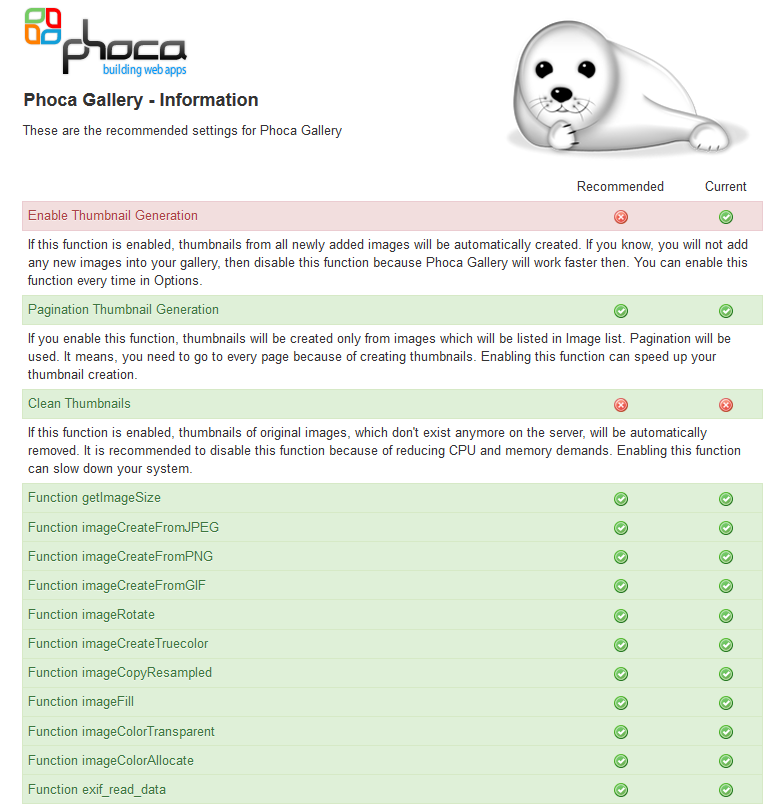
Kind regards,
Benno