Page 1 of 1
change default images title
Posted: 15 Sep 2014, 07:55
by mhparvaz
hello
By default, images title will be created from Filename; Is it possible to assign "Category title" for image title, instead of Filename?
Re: change default images title
Posted: 15 Sep 2014, 09:51
by Benno
Hi,
Yes this is possible.
See image:
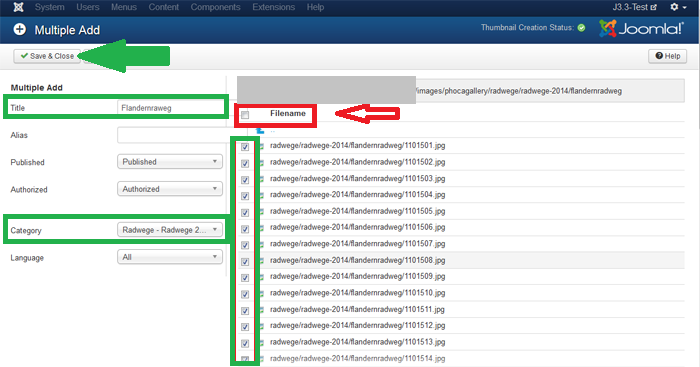
1.) Use Multiple Add
2.) Select the category
3.) Select the images
4.) Set Title (e.g. category title)
5.) Don't use Filename checkbox!!
6.) Save & Close
The result:
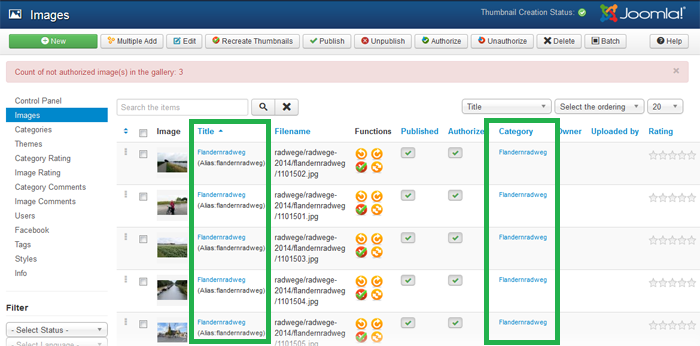
category title=image title
Kind regards,
Benno
Re: change default images title
Posted: 21 Sep 2014, 12:47
by mhparvaz
Hello!
Thanks for response!
In which file (in the phocagallery folder) determined that images title create from Filename?
Re: change default images title
Posted: 21 Sep 2014, 13:12
by Benno
Hi,
sorry, I don't understand. Phoca Gallery images titles are stored in the database.

Kind regards,
Benno
Re: change default images title
Posted: 25 Sep 2014, 16:06
by mhparvaz
Hi,
The previous question is solved!
But I have another question: I have a large number of images and categories in my phocagallery. I used "Multiple Add" to add images. But wrongly i use Filename checkbox.

and in Google, each Image have been introduced by its filename. Is there any solution to change all images title to their category title?
Re: change default images title
Posted: 25 Sep 2014, 17:00
by Benno
Hi,
But wrongly i use Filename checkbox.
and in Google, each Image have been introduced by its filename. Is there any solution to change all images title to their category title?
I don't know such a solution except, to rename every single image one by one.
backend --> Components --> Phoca Gallery --> Images --> Select Category --> Image --> Edit --> Image: [ Edit ] --> Edit Image --> Title *=(Set title like category title)
--> Alias=(Delete old alias)
Save & Close
New Alias will be created from new title during saving.
Kind regards,
Benno