Engaging articles, helpful advice, and behind-the-scenes thoughts on web development, CMS platforms, and digital trends.
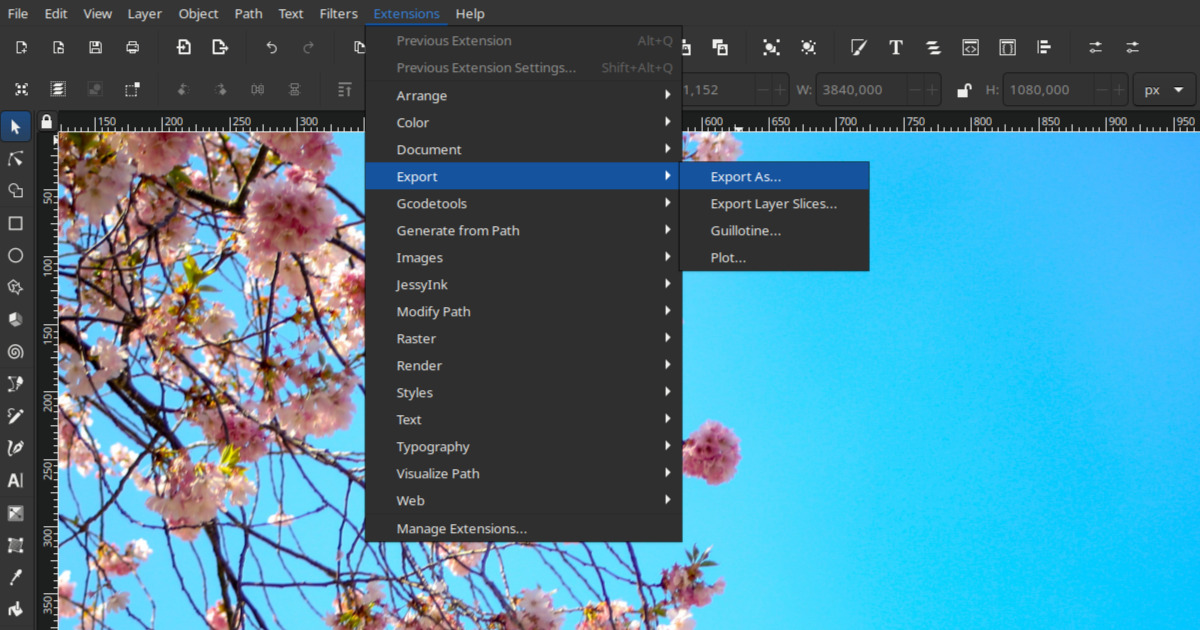
Phoca - Inkscape Save As extension is an Inkscape extension which allows you to export your image(s) to JPG, WEBP, AVIF or PNG format. As default, Inkscape can export images to PNG but there is no option to export them to JPG or WEBP format. Inkscape can already export images to PNG, JPG and WEBP by default. It does not yet have support for AVIF. This extension works a little differently than the default feature and allows:
- Full page export
- Selection area export - area of selected object(s) will be exported
- Custom area export - area of manually added coordinates will be exported.
There exist two GitHub projects that deal with the export of Inkscape images to JPG format but both are not more up-to-date for the newest Inkscape version.
Phoca - Inkscape Save As extension is inspired by both projects. It uses some code from both projects which was transformed to new Inkscape API and adds new options.

With Phoca - Inkscape Save As extension you can export images to JPG, WEBP, AVIF or PNG format. There are three options:
- Full page export
- Selection area export - area of selected object(s) will be exported
- Custom area export - area of manually added coordinates will be exported.
When using this extension, be aware:
- This extensions requires ImageMagick library installed on your system
- If the selected file has a different extension than the selected format then the file will be automatically renamed and may overwrite any existing file
- Current files are overwritten automatically, there is no warning
- When using the selection method, for more accurate and faster results, it is recommended to create one object that covers the area of all other objects, and only select this object when exporting.

How to install this extension:
Just follow Inkscape guides for installing Inkscape extensions (download the ZIP package and unzip it to Inkscape extension folder and restart Inkscape)
Possible issues and solution:
- If you get error message that your system does not have Imagemagick library installed, there is no other option, this library needs to be installed
- If you get error message regarding missing Python libraries, such needs to be installed on your system (e.g. if distutils library is missing on your linux system, just install it with "sudo apt-get install python3-distutils"
- If you get error message regarding fragments (objects) when using selection method, for example: "Element fragment does not have a document root!" or similar, then just create one object that covers the area of all other objects, and only select this object when exporting.
In the ever-evolving world of Joomla content management system (CMS), having a robust and versatile ecommerce solution is imperative to cater to the diverse needs of website owners. Phoca Cart, a modern ecommerce suite deeply ingrained in the Joomla CMS framework, emerges as a powerful and feature-rich option for online stores. On the other side of the spectrum, YOOtheme, renowned for its Joomla support, is a highly regarded theme and template provider that seamlessly integrates with Joomla, empowering users to create visually stunning websites. The recent integration of Phoca Cart with YOOtheme has brought about a synergy that further enhances ecommerce capabilities within the Joomla environment.
Understanding Phoca Cart
Phoca Cart is an innovative and feature-packed ecommerce extension designed for Joomla. It stands out by aligning itself with the Joomla CMS framework, ensuring a seamless and intuitive user experience. This modern ecommerce suite boasts a comprehensive array of features, making it an ideal choice for online businesses looking for a powerful ecommerce solution within the Joomla ecosystem.
YOOtheme: Enhancing Joomla with Style and Functionality
YOOtheme, a leading theme and template provider, offers exceptional support for Joomla. With a focus on both style and functionality, YOOtheme provides beautifully designed templates that cater to the aesthetic demands of modern websites. Its unique approach to design and intuitive user interface have garnered a significant user base within the Joomla community. YOOtheme’s templates are built on the foundation of UIkit, a lightweight and modular front-end framework, aligning perfectly with modern web development practices.
Phoca Cart and YOOtheme: A Perfect Match
The integration of Phoca Cart with YOOtheme paves the way for a seamless and harmonious ecommerce experience. Phoca Cart is designed to generate output in either Bootstrap or UIkit, making it inherently compatible with YOOtheme, which is based on the UIkit framework.
1) Basic Support with UIkit Rendering
Phoca Cart seamlessly integrates with YOOtheme by rendering its output in UIkit. This foundational level of support ensures that the ecommerce functionalities of Phoca Cart align with the design aesthetics of YOOtheme.
2) Tailored CSS Display
Phoca Cart offers users the ability to configure additional CSS options that specifically cater to YOOtheme templates. This customization allows for a more cohesive and integrated look when integrating Phoca Cart with YOOtheme-based websites.
3) Flexible Icon Display
Icons within Phoca Cart can be customized to match the design preferences of YOOtheme-based websites. Users have the option to choose between font or SVG icons, providing flexibility in design and visual representation. SVG icon set can be easily changed by template override. See: Changing SVG icons using template override.
Extensions for Seamless Integration:
Phoca Cart extends its capabilities for YOOtheme integration through two dedicated extensions:
4) PCuikit Extension
PCuikit is an extension tailored for Phoca Cart in Joomla. It is designed to seamlessly integrate with Phoca Cart, aligning with the UIkit framework and ensuring a flawless ecommerce experience.
PCuikit integrates the powerful Phoca Cart ecommerce platform for Joomla with the versatile YOOtheme Pro framework. With this integration, web designers and agencies can now leverage YOOtheme Builder's full potential to create visually stunning templates for various Phoca Cart views.
PCuikit supports templating for the following Phoca Cart views:
- Categories view
- Category view
- Product view.
This integration is a game-changer for businesses looking to elevate their online stores' appearance and functionality.
See: PCuikit
5) Yootheme PhocaCart Bridge
Yootheme PhocaCart Bridge is a bridge that links YOOtheme Pro Page Builder with PhocaCart. This integration offers a front-end, 'drag and drop' layout builder for PhocaCart entities, facilitating a dynamic and customizable ecommerce experience within the YOOtheme Pro environment.
See: Yootheme PhocaCart Bridge
6) Template Overrides for Enhanced Display
Phoca Cart includes template overrides for various modules, such as:
- Phoca Cart Cart module
- Phoca Cart Currency module
- Phoca Cart Wishlist module
- Phoca Cart Compare module
- Phoca Cart Search module.
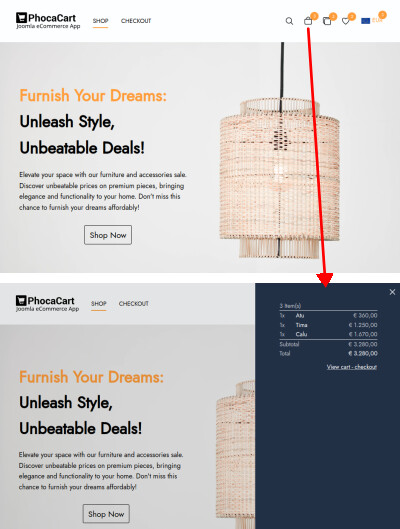
These overrides ensure seamless integration and optimal display, enhancing user experience and functionality. These modules' content can be displayed in dropdown or offcanvas menus, providing versatile options for showcasing ecommerce elements.
See: Phoca Cart template overrides
See: Phoca Cart template overrides documentation
The seamless integration of Phoca Cart with YOOtheme underscores the commitment to providing users with a cohesive ecommerce solution within the Joomla CMS. By aligning design elements and functionality, this integration aims to enhance the ecommerce experience, enabling website owners to create visually appealing online stores while leveraging the extensive features of Phoca Cart. With the combined power of Phoca Cart and YOOtheme, Joomla users can now elevate their online businesses to new heights, achieving a perfect harmony of aesthetics and ecommerce capabilities.
See: YOOtheme Pro
Quick instructions
1) Install Joomla CMS
2) Install Phoca Cart (component, module package, etc.)
3) Install Phoca Cart template overrides - e.g. Overrides - YOOtheme OffCanvas
4) Install YOOtheme PRO
5) Set YOOtheme as the default template
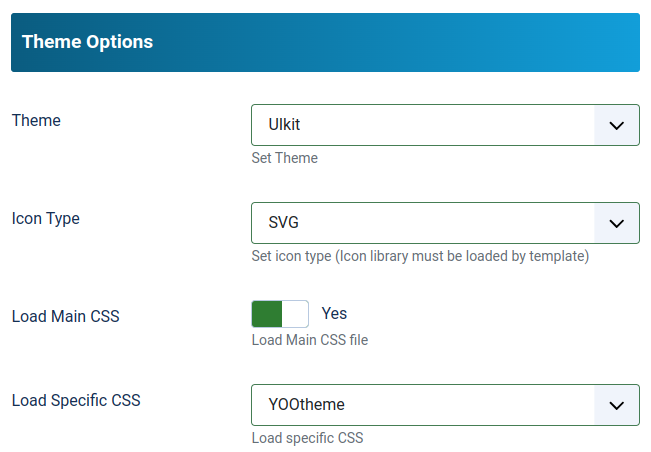
6) In Phoca Cart options, set the parameters Theme: UIkit, Icon Type: SVG, Load Specific CSS: YOOtheme
7) Set the position of Phoca Cart modules (Cart, Search, Compare, Wishlist, Currency) e.g. to "header" position
8) Create categories, products, etc. in Phoca Cart
9) Create a menu link to Phoca Cart (preferably to Categories view).
If you are not sure about something or need more detailed information, check the documentation pages or ask in the Phoca forum.
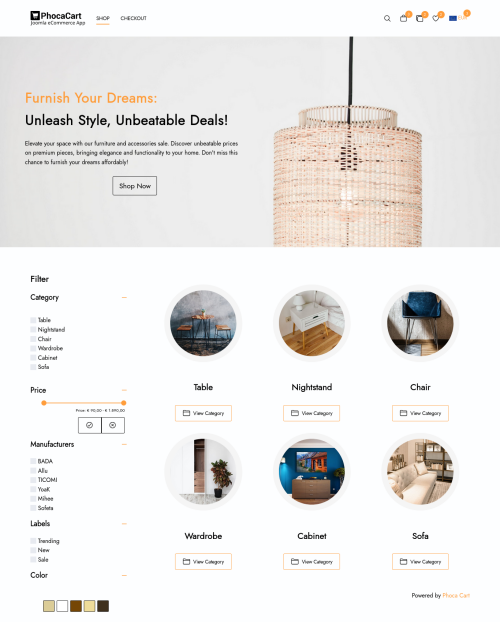
Phoca Cart - YOOtheme - categories view:
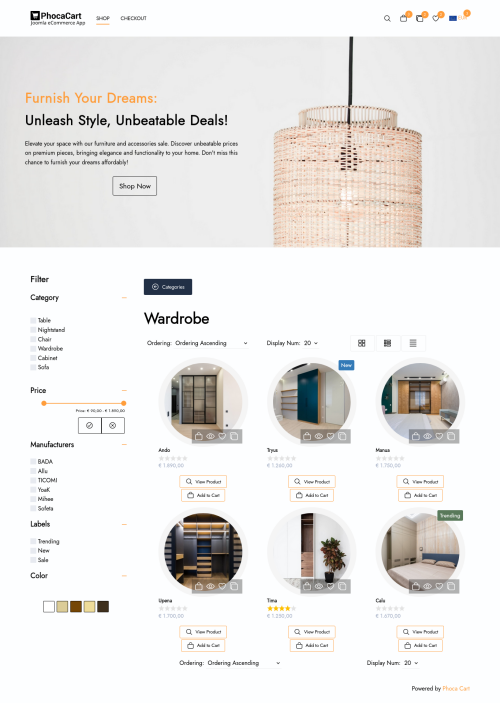
Phoca Cart - YOOtheme - category view:
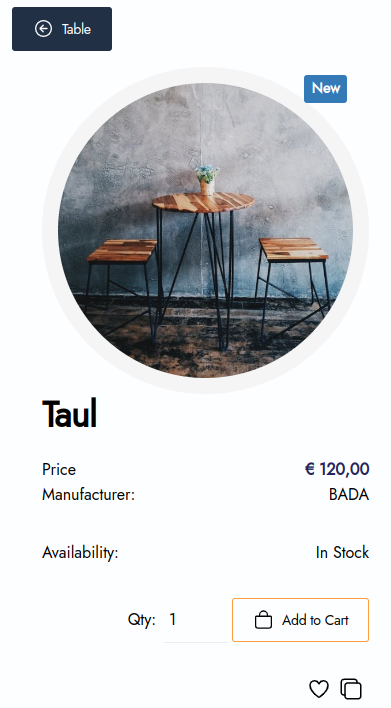
Phoca Cart - YOOtheme - product view (mobile)
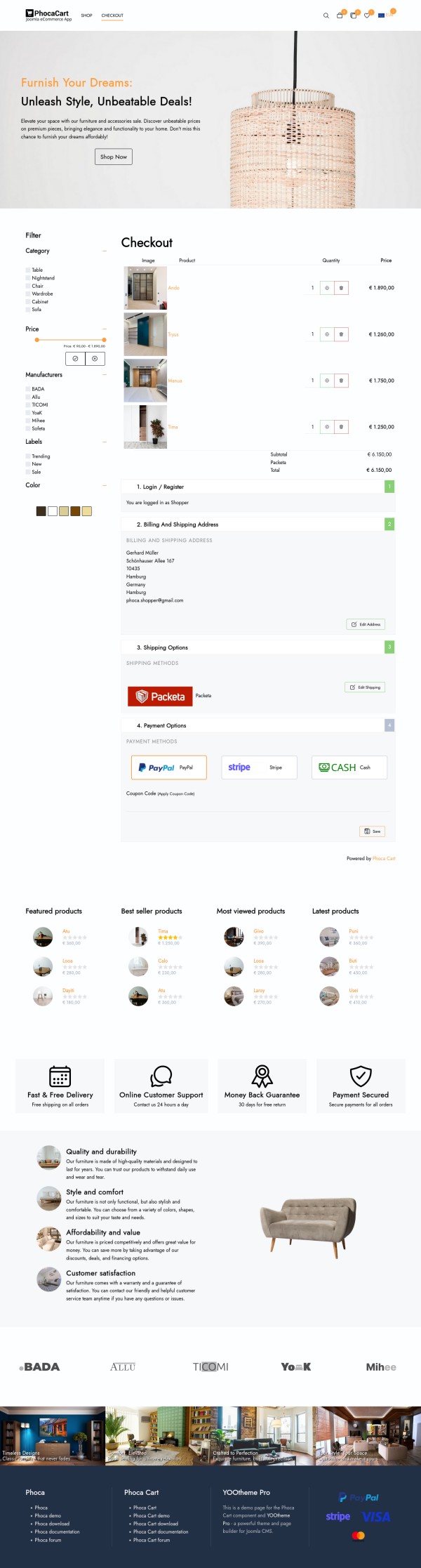
Phoca Cart - YOOtheme - checkout view:

There are many possible reasons why Google ads are not displayed on the website. Some of them are related to the website settings, some to the Google policies, and some to the technical issues. Here are some of the most common causes and how to fix them:
- The website is not verified by Google. To display Google ads, the website owner needs to verify their site with Google Search Console and request a review from Google AdSense. This process can take up to 48 hours.
- The website violates the Google AdSense program policies. Google has strict rules about the content, design, and behavior of the websites that use its ads. If the website contains prohibited content, such as adult, violent, or illegal material, or if it uses deceptive or intrusive practices, such as pop-ups, auto-play videos, or malware, Google may disable the ads or suspend the account.
- The ad code is not implemented correctly. The website owner needs to copy and paste the ad code from Google AdSense to their website without modifying it. If the code is altered, incomplete, or placed in the wrong location, the ads may not show up. The website owner can use the Google AdSense code inspector tool to check for errors and fix them.
- The ad unit is not responsive or adaptive. Google recommends using responsive or adaptive ad units that automatically adjust to the size and layout of the website and the device. If the ad unit is fixed or custom-sized, it may not fit the available space on the website or the screen resolution of the user. This can cause the ads to be cropped, distorted, or hidden.
- The width of the potential ads box is not known. Sometimes, the website may use a dynamic layout that changes depending on the content or user interaction. In this case, the width of the potential ads box may not be known in advance or may vary during the page load. This can prevent Google from serving relevant and well-fitting ads. To solve this problem, the website owner can use a placeholder element with a fixed width and height to reserve space for the ads, or use a responsive ad unit that adapts to the available space.
If you are using the Phoca Google AdSense Easy module and suspect that your ads are not displaying because of the last mentioned point, try specifying some width to the ad box.
In the module settings, navigate to the Advanced tab and fill in the CSS Style parameter. For example, for a vertical ad, enter the following value: min-width:25vw;
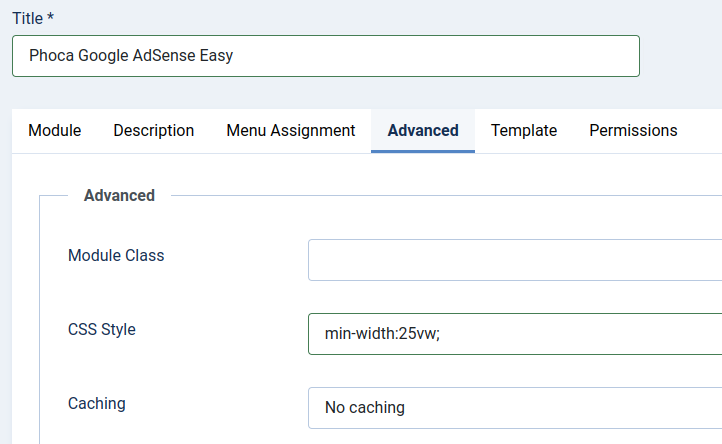
Save and check if the ad has started to display.

In today's digital age, having an online presence for your restaurant is crucial. To effectively showcase your culinary offerings and engage with potential customers, you need a reliable content management system (CMS) that suits your needs. Two popular options for creating restaurant menus and managing content are:
- Phoca Restaurant Menu for Joomla - a Joomla component
- and Phoca Restaurant Menu WP Edition - a WordPress Gutenberg plugin.
In this article, we'll explore the key differences between these two solutions and help you decide which one is the right choice for your restaurant's online presence.
Joomla vs. WordPress: The CMS Landscape
Before diving into the specifics of Phoca Restaurant Menu extensions, let's briefly compare Joomla and WordPress. Joomla is known for its robust and feature-rich platform, making it an ideal choice for complex websites with diverse needs. It offers a wide array of options and customization possibilities.
On the other hand, WordPress is renowned for its simplicity and ease of use. It's a go-to choice for individuals and businesses looking to quickly set up a website and produce straightforward content. WordPress excels in delivering user-friendly experiences, but it may lack some advanced features compared to Joomla.
Phoca Restaurant Menu for Joomla
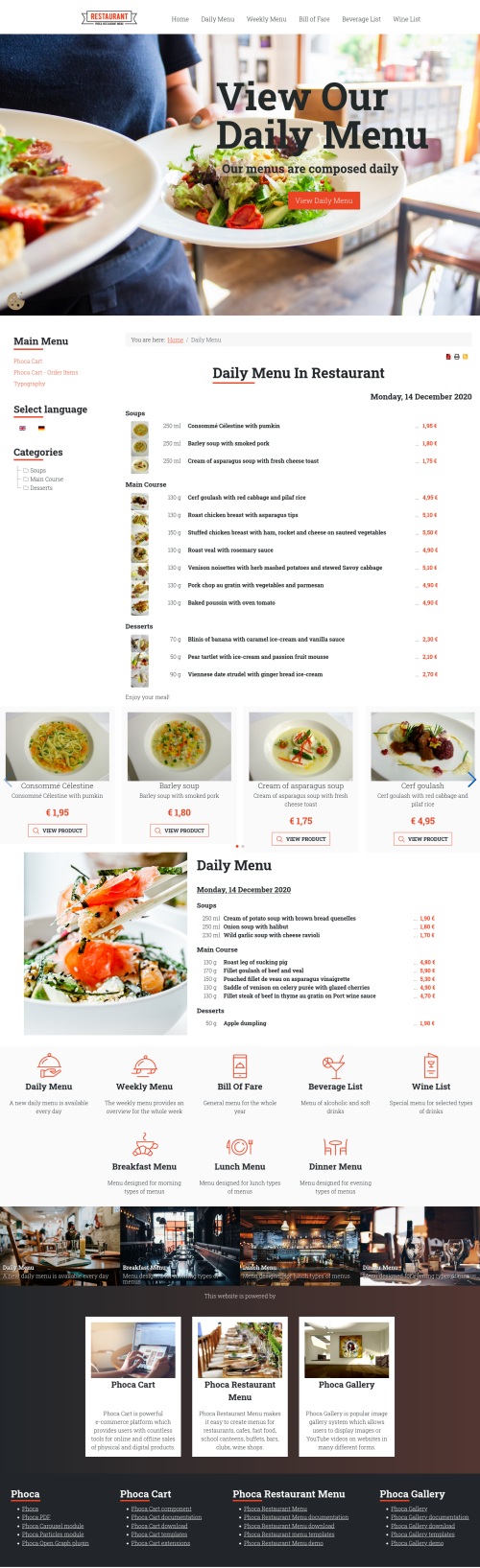
Phoca Restaurant Menu for Joomla is a comprehensive extension designed to cater to various food-related businesses, including restaurants, cafeterias, fast-food joints, and more. Here are some of the key features and functionalities that Joomla users can enjoy with this extension:
- Versatile Display Options: Joomla users can display their restaurant menus in multiple formats, including HTML, PDF, and RSS. This versatility ensures that your menu can reach your customers through various channels.
- Email Integration: You can send menu updates directly to your customers via email, keeping them informed about your offerings and promotions.
- Screenshot Generation: Automatically create menu screenshots, perfect for sharing on social media platforms to entice potential diners.
- Multilanguage Support: Phoca Restaurant Menu is ready for multilanguage support, making it suitable for restaurants targeting diverse customer bases.
- Administration Methods: Joomla users can choose from various administration methods, including step-by-step item addition, bulk import, or raw text entry using Markdown.
- Various View Types: The Joomla version offers a variety of view types, such as Daily Menu, Weekly Menu, Bill of Fare, Beverage List, Wine List, Breakfast Menu, Lunch Menu, and Dinner Menu.
Download: Phoca Restaurant Menu (Joomla) download site.
Demo: Phoca Restaurant Menu Joomla demo site.
Phoca Restaurant Menu WP Edition (WordPress Gutenberg Plugin)
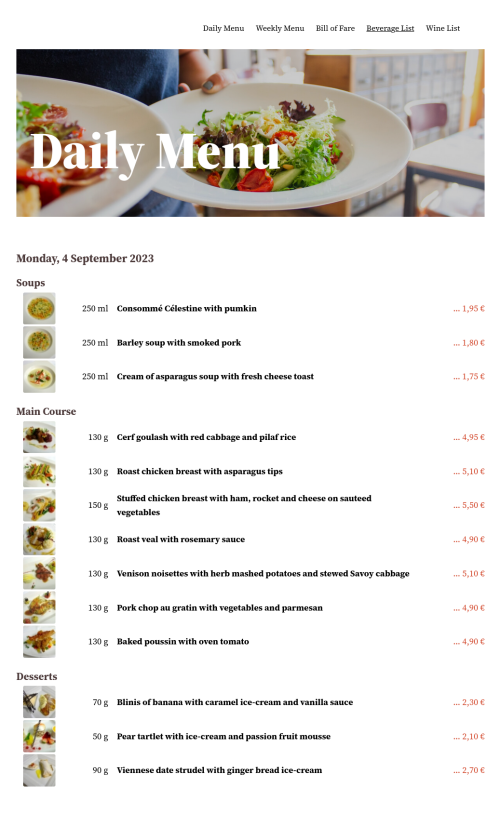
The WordPress Gutenberg plugin edition of Phoca Restaurant Menu is designed for simplicity and ease of use. It caters primarily to users who require straightforward menu display options for their restaurant websites. The key features of the WordPress edition include:
- User-Friendly: WordPress is known for its user-friendly interface, making it an excellent choice for individuals and businesses seeking a hassle-free website setup.
- Menu Display: Just like its Joomla counterpart, the WordPress edition allows you to display menus for your restaurant with ease.
- View Types: The WordPress edition offers following menu types: Daily Menu, Weekly Menu, Bill of Fare, Beverage List, Wine List.
Download: Phoca Restaurant Menu WP Edition (WordPress) download site.
Demo: Phoca Restaurant Menu WP Edition demo site.
Choosing the Right Version for Your Restaurant
In summary, when it comes to selecting the right version of Phoca Restaurant Menu for your restaurant, consider your specific needs and your familiarity with the CMS platforms. For users looking to create a simple restaurant website with straightforward menu display, the WordPress Gutenberg plugin edition is an excellent choice. Its user-friendly interface and menu display options make it a convenient solution.
However, if you have more complex requirements, such as multilingual support, advanced administration methods, and diverse display options, Joomla's Phoca Restaurant Menu is the better fit. Joomla's flexibility and extensive feature set make it ideal for restaurants with intricate needs.
In the end, the choice between Joomla and WordPress versions of Phoca Restaurant Menu depends on your restaurant's specific requirements. Both options offer powerful tools to enhance your online presence, ensuring that your culinary creations reach your target audience effectively. When making your decision, remember that Joomla suits complex websites, while WordPress shines for simplicity, catering to users who prioritize ease of use.
In conclusion, the Phoca Restaurant Menu extension offers versatile solutions for restaurant websites, catering to both Joomla and WordPress users. Evaluate your needs and CMS preferences to make an informed choice and elevate your restaurant's online presence.

When it comes to running an online store, one of the most critical aspects is ensuring a seamless and secure payment process for your customers. Phoca Cart, a popular e-commerce extension for Joomla, offers a range of payment methods to cater to different customer preferences. In this article, we'll explore the top 5 featured payment methods for Phoca Cart, highlighting their benefits and how they enhance the shopping experience.
1. PayPal Standard
PayPal needs no introduction. It's a globally recognized and trusted online payment solution. The PayPal Standard Plugin for Phoca Cart integrates seamlessly into your online store, allowing customers to pay using their PayPal accounts or major credit cards. With its user-friendly interface and widespread familiarity, the PayPal Standard Plugin offers a secure and efficient checkout process, which can help boost customer confidence and increase conversions.
See: Phoca Cart PayPal Standard plugin
2. Stripe
Stripe is a robust and versatile payment gateway that provides a smooth and secure online payment experience. With its integration into Phoca Cart, your customers can pay using credit cards, debit cards, and even digital wallets like Apple Pay. Stripe's advanced fraud detection, customizable checkout, and compatibility with various currencies and payment methods make it a top choice for businesses aiming to provide a modern and frictionless payment process. Stripe checkout plugin also supports 3rd party payment methods as Sofort, giropay, iDEAL, Bancontact, Alipay, Przelewy24, EPS and others.
See: Phoca Cart Stripe plugin
See: Phoca Cart Stripe Checkout plugin
3. Cash on Delivery
The Cash on Delivery payment method remains a preferred choice for many customers, especially those who value the traditional "pay when you receive" approach. Phoca Cart's Cash on Delivery option enables customers to place an order online and make the payment upon delivery. This method can be particularly appealing to customers who may have concerns about sharing their financial information online or those who prefer the convenience of paying in person.
See: Phoca Cart Cash on Delivery plugin
4. GoPay
GoPay is a rapidly growing online payment gateway, particularly popular in Central and Eastern Europe. With the GoPay integration for Phoca Cart, your store can tap into this emerging market and offer customers a seamless way to pay using their preferred local payment methods. GoPay's user-friendly interface and focus on security make it an excellent addition to your payment options, especially if you're targeting customers in regions where it's widely used.
5. QuickPay
QuickPay is another notable payment solution that seamlessly integrates with Phoca Cart. It offers a wide range of payment methods, including credit cards, mobile payments, and online banking options. QuickPay's user-friendly dashboard allows you to manage transactions and monitor the payment process effectively. With features like one-click payments and subscription support, QuickPay empowers you to offer flexible payment solutions to your customers.
See: Phoca Cart QuickPay plugin
In conclusion, the success of an online store depends on providing customers with convenient, secure, and diverse payment options. The top 5 featured payment methods for Phoca Cart - PayPal Standard, Cash on Delivery, GoPay, Stripe, and QuickPay - each bring their own strengths to the table. By incorporating these methods into your Phoca Cart powered store, you can enhance the shopping experience, build trust with your customers, and drive higher conversion rates.